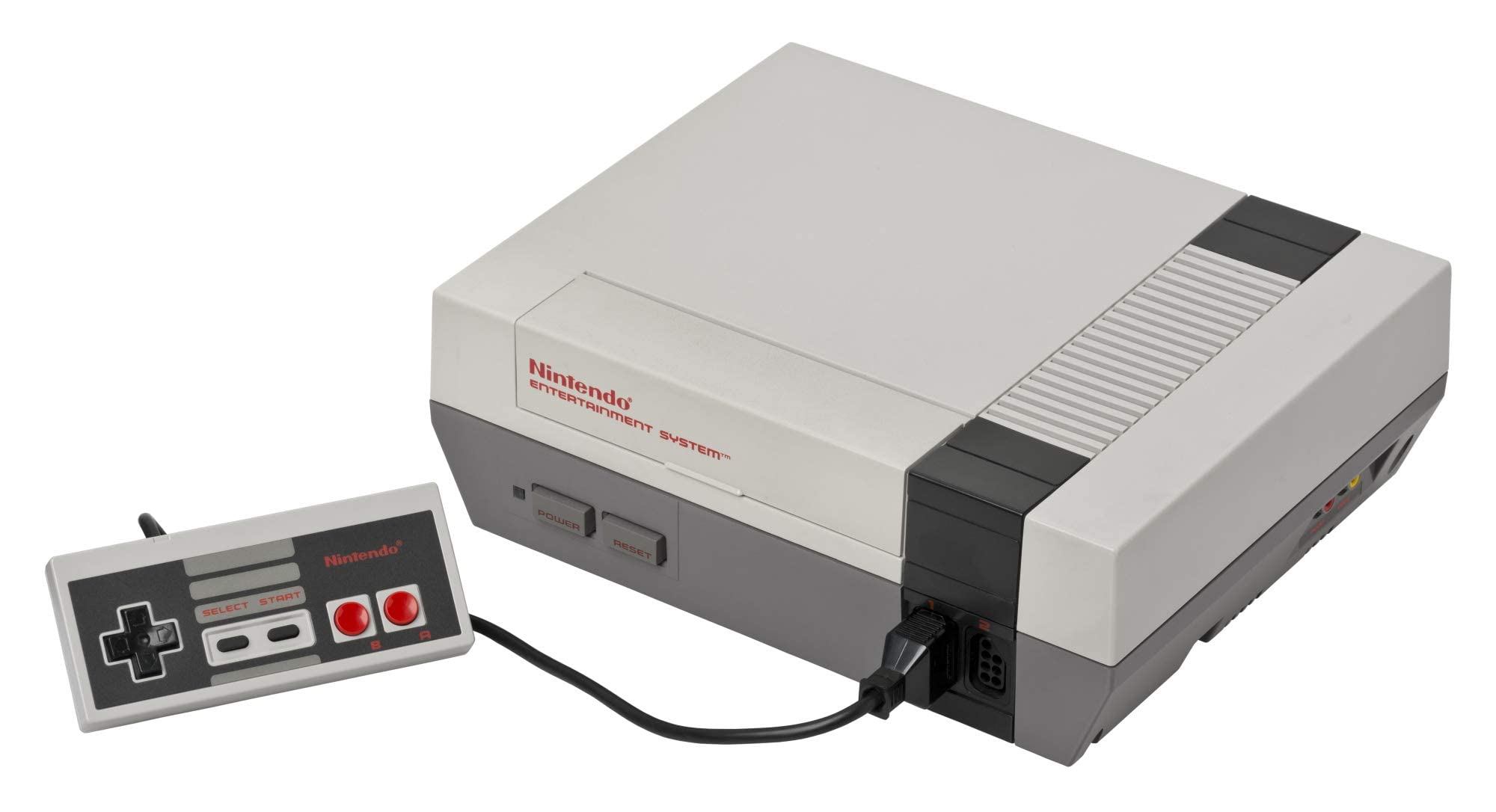
NES Console

NES (Nintendo Entertainment System)

Nintendo Entertainment System (NES)

The console that revived an industry. Explore the 8-bit architecture, legendary library, and technical nuances of the NES. With Rec0m88, you can play retro games from the NES era with cycle-accurate emulation, CRT shader support, and seamless P2P netplay. No configuration. No latency. Just pure 8-bit nostalgia.

Hardware Architecture

Launched as the Family Computer (Famicom) in Japan on July 15, 1983, and rebranded for North America on October 18, 1985, the NES is built around the 8-bit Ricoh 2A03 CPU (a modified MOS 6502) running at 1.79 MHz (NTSC). The system features 2 KB of onboard RAM and a dedicated Picture Processing Unit (PPU) capable of rendering 256×240 resolution with a 52-color palette from 64 available colors.

What truly defined the NES was its audio and expansion capabilities. The Audio Processing Unit (APU) provides five sound channels. The cartridge slot allowed for Mapper Chips (like MMC1, MMC3, and VRC6) inside the game carts themselves, expanding memory, enabling advanced scrolling effects, and adding extra audio channels.

  • CPURicoh 2A03 @ 1.79 MHz (NTSC)
  • GraphicsPPU, 256×240, 64 sprites on screen
  • MediaFormats.nes .unf .fds (.zip/.7z supported)

Rec0m88 NES Emulation

Rec0m88 utilizes the EmulatorJS framework to deliver high-fidelity NES emulation. We default to the fceumm core for its exceptional balance of speed and compatibility, while offering the Nestopia core for users demanding cycle-accurate precision. Both cores support the full range of mapper chips, ensuring that even complex titles run flawlessly.

BIOS REQUIREMENTS

Standard NES: No BIOS required.
Famicom Disk System: Requires disksys.rom.
Game Genie: Requires gamegenie.nes (fceumm only). Rec0m88 has its own editable, built-in cheats that can be used.

When you play retro games on Rec0m88, you benefit from modern enhancements without compromising authenticity. Features include instant save states, rewind functionality, fast-forward, CRT shaders, and customizable controller mapping.

Iconic Titles & Netplay Revolution

The NES library established genres that dominate gaming today. From tough-as-nails platformers to the dawn of console RPGs, it laid the foundation for modern interactive entertainment.

The Definitive 8-Bit Library

Platformers reached new heights with Super Mario Bros. and Super Mario Bros. 3, while The Legend of Zelda and Metroid pioneered non-linear exploration. RPGs found their console footing with Final Fantasy and Dragon Quest, and action shooters like Contra and Mega Man tested the reflexes of a generation. Whether you’re revisiting classics or discovering hidden gems, Rec0m88 ensures every title runs with pixel-perfect accuracy.

World-Class Netplay

Rec0m88 transforms the solitary experience of emulation into a social one. Our WebRTC netplay allows you to play online with friends as if they were sitting next to you. Simply host a room, share the ID, and jump into co-op classics like Contra, Bubble Bobble, or TMNT. Competitive titles like Tetris and Dr. Mario also shine with our low-latency architecture.

Most Popular NES Games

Super Mario Bros. 3
Platformer
The Legend of Zelda
Action Adventure
Contra
Run & Gun / Co-Op
Mega Man 2
Action Platformer
Metroid
Action Adventure
Punch-Out!!
Sports / Action

How to Play NES Games on Rec0m88

Rec0m88 offers a streamlined desktop experience for managing and playing your NES collection. Follow these steps to build your library and start gaming instantly.

Step 01
Download Rec0m88
Windows · macOS · Linux

Grab the free desktop client. It’s a lightweight GUI frontend that integrates EmulatorJS cores for instant emulation without browser overhead.

Step 02
Organize Your Library
Metadata · Box Art

Use the free Game Library Organizer to scan your ROM folder. It fetches box art and metadata, exporting a clean Rec0m88 Catalog file.

Step 03
Load Your ROM
.nes / .zip / .7z

Import your exported Catalog, or drag-and-drop individual files directly into the app window to launch instantly.

Step 04
Start Netplay
Host & Share ID

Map your controller, enable CRT shaders, and use the Netplay menu to host rooms and play multiplayer classics together.

NES Emulation FAQ

Do I need a BIOS file to play NES games?

No. Standard NES cartridge games do not require a BIOS file. However, if you want to play Famicom Disk System (FDS) titles, you must place a disksys.rom file in your BIOS directory. Rec0m88 will automatically detect it.

Why does a specific game have graphical glitches?

Some obscure titles use rare mapper chips that may behave differently across cores. If you encounter issues, try switching the emulation core in the settings. Nestopia offers higher accuracy for tricky mappers, while fceumm provides broader compatibility.

Can I play NES games online with friends?

Yes. Rec0m88 features built-in P2P rollback netplay. You can host a room and share the Room ID with a friend. Both players need the same ROM file. The connection is direct and low-latency, perfect for co-op and versus play.

What file formats are supported?

Rec0m88 supports .nes, .unif, .unf, and .fds formats. You can also load games compressed in .zip or .7z archives; the emulator will extract them automatically. Ensure your ROMs have correct headers for best compatibility.

Ready to play? Download Rec0m88 free and experience the 8-bit library in pixel-perfect accuracy today.
Similar Posts

  • Sega Saturn

    Retro Console Encyclopedia Sega Saturn The undisputed king of 32-bit 2D graphics and Sega’s most complex hardware achievement. Released in 1994, the Sega Saturn delivered arcade-perfect fighting games, groundbreaking shooters, and an unparalleled Japanese library. With Rec0m88, you can play retro games from the Saturn era natively on your desktop, conquering its legendary dual-CPU architecture…

  • NDS (Nintendo DS)

    Retro Console Encyclopedia Nintendo DS (NDS) The best-selling handheld console of all time. Released in 2004, the Nintendo DS revolutionized gaming with its dual screens, touch interface, and built-in microphone, paving the way for modern mobile gaming while delivering some of the greatest Nintendo classics ever made. With Rec0m88, you can play retro games from…

  • C64 (Commodore 64)

    Retro Console Encyclopedia Commodore 64 (C64) The highest-selling single computer model of all time. Released in 1982, the Commodore 64 brought affordable computing and incredible gaming into millions of living rooms. With Rec0m88, you can play retro games from the golden age of microcomputers effortlessly, bypassing complex keyboard commands with streamlined emulation, virtual joysticks, and…

  • Panasonic 3DO

    Retro Console Encyclopedia 3DO Interactive Multiplayer The ambitious, expensive 32-bit pioneer of the CD-ROM era. Released in 1993, the 3DO promised a multimedia revolution, bringing crystal-clear Full Motion Video (FMV) and cutting-edge 3D graphics to the living room. With Rec0m88, you can play retro games from the legendary 3DO library directly on your desktop, complete…

  • PSX (PlayStation 1)

    Retro Console Encyclopedia Sony PlayStation (PS1) The console that brought cinematic 3D gaming to the mainstream. Released in 1994, the original PlayStation (PS1 / PSX) dominated the 32-bit era with its CD-ROM format, sweeping orchestral scores, and massive library. With Rec0m88, you can play retro games from the PS1 era natively on your desktop, complete…

  • MAME (Multiple Arcade Machine Emulator)

    Retro Console Encyclopedia MAME & Arcade The ultimate preservation project. MAME (Multiple Arcade Machine Emulator) brings the golden age of coin-op cabinets directly to your screen. From the neon-lit 80s to the competitive fighting game boom of the 90s, arcade hardware always represented the bleeding edge of gaming tech. With Rec0m88, you can play retro…

Leave a Reply

Your email address will not be published. Required fields are marked *