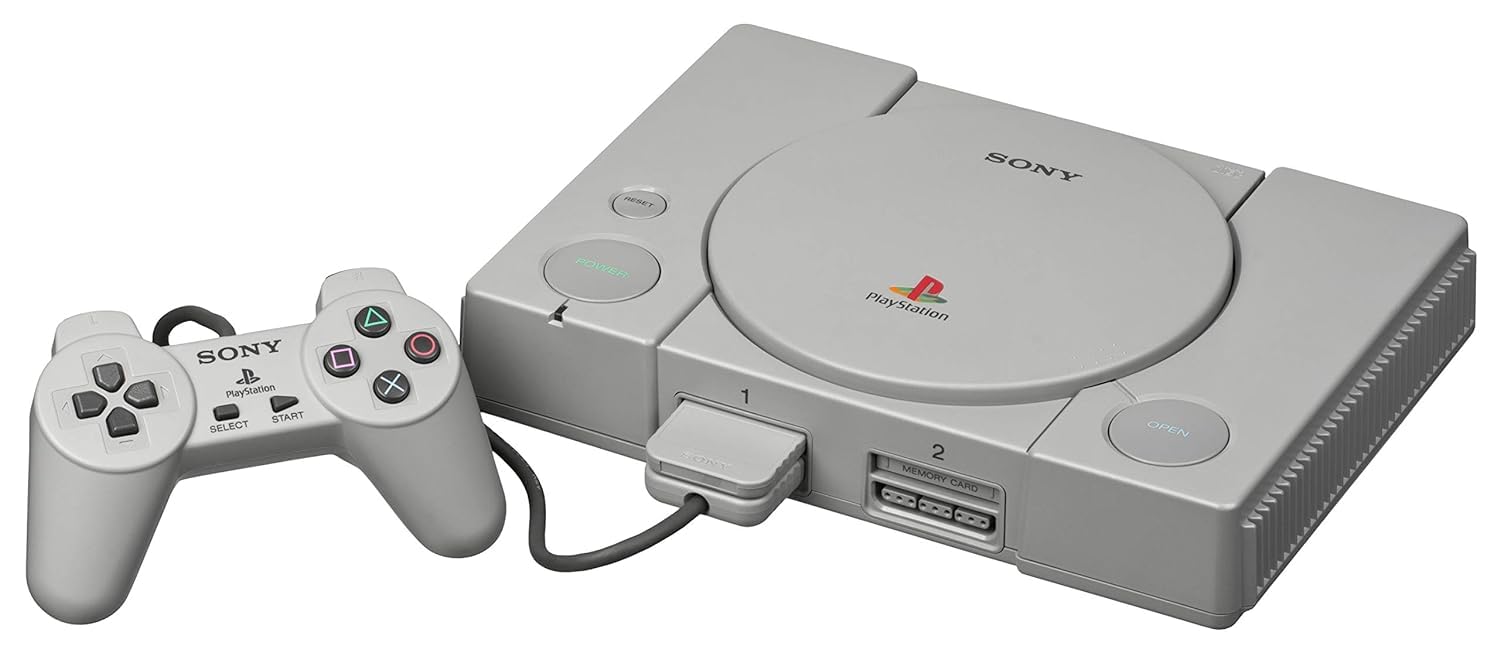
PSX Console

PSX (PlayStation 1)

Sony PlayStation (PS1)

The console that brought cinematic 3D gaming to the mainstream. Released in 1994, the original PlayStation (PS1 / PSX) dominated the 32-bit era with its CD-ROM format, sweeping orchestral scores, and massive library. With Rec0m88, you can play retro games from the PS1 era natively on your desktop, complete with modern high-resolution upscaling, widescreen hacks, and seamless netplay.

Hardware Architecture

Sony’s first foray into console hardware was a masterclass in 3D-focused design. At its core is a 32-bit MIPS R3000A CPU running at 33.86 MHz, paired with a dedicated Geometry Transformation Engine (GTE). The GTE allowed the console to process 3D math and vector calculations at unprecedented speeds for the time.

By utilizing CD-ROMs, developers had 650MB of storage compared to the paltry few megabytes of 16-bit cartridges. This enabled full-motion video (FMV) cutscenes and CD-quality redbook audio. The system’s Sound Processing Unit (SPU) supported 24 channels of ADPCM audio, forever changing the scope of video game soundtracks.

  • CPU & Coprocessor32-bit LSI R3000 & Geometry Transformation Engine
  • Memory2MB System RAM, 1MB VRAM, Memory Card Saves
  • MediaFormats.chd .pbp .cue/.bin .iso

Rec0m88 PS1 Emulation

Rec0m88 uses the highly optimized SwanStation and Beetle PSX cores via EmulatorJS. These modern cores do more than just emulate; they enhance. You can enable PGXP (Precision Geometry Transform Pipeline) to eliminate the famous “polygon wobble” and texture warping that plagued original hardware.

BIOS REQUIREMENTS (CRITICAL)

The PS1 requires official BIOS files to boot games accurately. You must place scph5501.bin (US), scph5500.bin (JP), and scph5502.bin (EU) into your Rec0m88 bios directory.

In addition to graphical enhancements, Rec0m88 supports internal resolution upscaling (up to 4K), widescreen hacks, automatic multi-disc handling via .m3u playlists, and full analog DualShock controller support.

A Generation-Defining Catalog

The PS1 wasn’t just a console; it was a cultural shift. It matured the gaming industry with deep, story-driven narratives, expansive 3D worlds, and fierce competitive fighters.

Cinematic Masterpieces

The console birthed genres. Final Fantasy VII, VIII, and IX revolutionized the JRPG. Metal Gear Solid invented stealth-action, while Resident Evil and Silent Hill defined survival horror. Meanwhile, Castlevania: Symphony of the Night proved that 2D gaming still had massive potential in a 3D world, and Crash Bandicoot became an icon.

Competitive Netplay

With Rec0m88’s integrated WebRTC rollback netplay, you can relive the glory days of couch multiplayer online. Face off in flawless matches of Tekken 3, Street Fighter Alpha 3, or Marvel vs. Capcom. Grab a friend and race in Crash Team Racing or Gran Turismo 2 with absolutely minimal input delay.

Most Popular PS1 Games

Final Fantasy VII
JRPG
Metal Gear Solid
Stealth Action
Resident Evil 2
Survival Horror
Castlevania: SotN
Action Platformer
Crash Bandicoot
Platformer
Tekken 3
Fighting

How to Play PS1 Games Online with Rec0m88

Disc-based emulation used to be difficult. Rec0m88 simplifies the process of managing heavy CD files, memory cards, and multi-disc swapping.

Step 01
Install BIOS Files
scph5501.bin

Before you can play, you must obtain the PS1 BIOS files and place them in your Rec0m88 bios directory. The emulator will not boot games without them.

Step 02
Format Your ROMs
Convert to .CHD

For the best experience, we highly recommend compressing your messy .cue/.bin files into single .chd files. They save massive amounts of hard drive space and load instantly.

Step 03
Map DualShock
Analog Controls

Go into the input settings and map your controller. Ensure the controller type is set to “DualShock” so you can use your analog sticks in supported games.

Step 04
Enhance & Play
PGXP & Upscaling

Open the core options menu to increase the internal resolution to 1080p, enable PGXP geometry correction, and fix texture warping for a stunning HD remaster experience.

PS1 Emulation FAQ

How do I play games with multiple discs (like Final Fantasy VII)?

To handle multi-disc games properly without losing save data, you should create an .m3u playlist file. This is a simple text file containing the filenames of your game’s discs (e.g., Disc 1.chd, Disc 2.chd). Load the .m3u file into Rec0m88, and you can swap discs inside the emulator menu when the game prompts you.

Why do the 3D models wobble and shake when moving?

The original PS1 lacked sub-pixel precision and Z-buffering, causing vertices to “snap” to a grid. In Rec0m88, you can fix this by enabling PGXP Geometry Correction in the core options. This calculates 3D models at modern precision, completely removing the wobble.

My game doesn’t have any background music. Why?

This usually happens if you load a .bin file directly instead of the .cue file. The .cue file tells the emulator where the CD audio tracks are located. Alternatively, compress your game into a .chd format, which perfectly encapsulates the game data and CD audio into one neat file.

How do memory cards work?

Rec0m88 automatically generates virtual memory card files in your save directory. You don’t need to manually manage blocks or formatting. Standard in-game saving works perfectly, though you can also use Emulator Save States for instant resuming.

Ready to play? Download Rec0m88 free and experience the 32-bit PlayStation era in beautiful high-definition.

Similar Posts

  • NES (Nintendo Entertainment System)

    Retro Console Encyclopedia Nintendo Entertainment System (NES) The console that revived an industry. Explore the 8-bit architecture, legendary library, and technical nuances of the NES. With Rec0m88, you can play retro games from the NES era with cycle-accurate emulation, CRT shader support, and seamless P2P netplay. No configuration. No latency. Just pure 8-bit nostalgia. Hardware…

  • Panasonic 3DO

    Retro Console Encyclopedia 3DO Interactive Multiplayer The ambitious, expensive 32-bit pioneer of the CD-ROM era. Released in 1993, the 3DO promised a multimedia revolution, bringing crystal-clear Full Motion Video (FMV) and cutting-edge 3D graphics to the living room. With Rec0m88, you can play retro games from the legendary 3DO library directly on your desktop, complete…

  • N64 (Nintendo 64)

    Retro Console Encyclopedia Nintendo 64 (N64) The console that ushered in the 3D revolution. Released in 1996, the Nintendo 64 pioneered true 3D environments, introduced the modern analog stick, and made 4-player local multiplayer a standard. With Rec0m88, you can play retro games from the 64-bit era natively on your desktop, complete with high-resolution upscaling,…

  • NDS (Nintendo DS)

    Retro Console Encyclopedia Nintendo DS (NDS) The best-selling handheld console of all time. Released in 2004, the Nintendo DS revolutionized gaming with its dual screens, touch interface, and built-in microphone, paving the way for modern mobile gaming while delivering some of the greatest Nintendo classics ever made. With Rec0m88, you can play retro games from…

  • TurboGrafx-16

    Retro Console Encyclopedia TurboGrafx-16 (PC Engine) The 16-bit graphics powerhouse with an 8-bit heart. Released in Japan in 1987 as the PC Engine and in North America in 1989, the TurboGrafx-16 revolutionized gaming with its sleek HuCards and pioneered the CD-ROM format. With Rec0m88, you can play retro games from both the standard and CD…

  • Wonderswan

    Retro Console Encyclopedia Bandai WonderSwan The final hardware masterpiece from Game Boy creator Gunpei Yokoi. Released exclusively in Japan in 1999 (and followed by the Color and Crystal models), the WonderSwan challenged Nintendo with its unique design that allowed games to be played horizontally or vertically. With Rec0m88, you can play retro games from this…

Leave a Reply

Your email address will not be published. Required fields are marked *