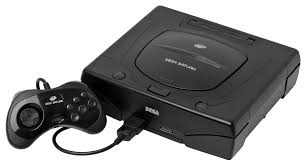
Sega Saturn Console

Sega Saturn

Sega Saturn

The undisputed king of 32-bit 2D graphics and Sega’s most complex hardware achievement. Released in 1994, the Sega Saturn delivered arcade-perfect fighting games, groundbreaking shooters, and an unparalleled Japanese library. With Rec0m88, you can play retro games from the Saturn era natively on your desktop, conquering its legendary dual-CPU architecture with modern, high-accuracy emulation and lag-free netplay.

Hardware Architecture

The Saturn’s internal design is infamous among developers. To compete with the incoming 3D revolution, Sega utilized two 32-bit Hitachi SH-2 CPUs running at 28.6 MHz. Graphics were handled by two distinct custom video processors: VDP1 (handling sprites and 3D polygons drawn as quadrilaterals, not triangles) and VDP2 (handling infinite background planes and hardware scaling/rotation).

Audio was equally over-engineered, driven by a custom Motorola 68EC000 processor paired with a Yamaha FH1 DSP capable of 32 channels of FM synthesis and PCM sampling. The console also featured a cartridge slot for memory expansion, enabling the 4MB RAM carts necessary for flawless ports of Capcom’s heavy-hitting 2D fighters.

  • CPUs & GraphicsDual Hitachi SH-2 / VDP1 & VDP2
  • AudioCustom Motorola 68EC000 & Yamaha DSP
  • MediaFormats.chd .cue/.bin .iso

Rec0m88 Saturn Emulation

Saturn emulation is notoriously demanding due to the synchronization required between its multiple processors. Rec0m88 tackles this by utilizing the highly accurate Beetle Saturn (Mednafen) core via EmulatorJS, ensuring pixel-perfect 2D rendering and correct quad-based 3D geometry without visual artifacts.

BIOS REQUIREMENTS (CRITICAL)

The Saturn emulator requires official BIOS files to operate. You must place sega_101.bin (JP) and mpr-17933.bin (US/EU) into your Rec0m88 bios directory. Without these, games will simply fail to load.

Rec0m88 automatically handles 4MB RAM Cartridge emulation, meaning memory-heavy games like X-Men vs. Street Fighter boot up instantly. It also supports multi-disc game playlists and the 3D Analog Control Pad for games like NiGHTS.

Arcade Perfection

While it struggled commercially against the PS1, the Saturn has aged beautifully. It remains the absolute best console for hardcore 2D fighting games, arcade shoot ’em ups, and unique first-party Sega experiences.

The Heavy Hitters

Experience Sega’s arcade dominance at home with Virtua Fighter 2, Sega Rally Championship, and Virtua Cop. Dive into legendary exclusives like Panzer Dragoon Saga, NiGHTS into Dreams, Shining Force III, and Burning Rangers. For 2D purists, the Saturn versions of Street Fighter Alpha 3, Vampire Savior, and Radiant Silvergun are unmatched.

Legendary Netplay Lobbies

The Saturn was home to some of the craziest party games ever made. With Rec0m88’s WebRTC rollback netplay, you can host lag-free sessions of Treasure’s masterpiece Guardian Heroes (up to 6 players) or the absolutely chaotic Saturn Bomberman (which supported up to 10 players simultaneously).

Most Popular Saturn Games

NiGHTS into Dreams
Action
Panzer Dragoon Saga
RPG
Virtua Fighter 2
Fighting
Guardian Heroes
Beat ‘Em Up
Radiant Silvergun
Shoot ‘Em Up
Saturn Bomberman
Multiplayer Action

How to Play Saturn Games Online with Rec0m88

Emulating the Saturn’s complex dual-CPU architecture requires zero configuration on your end with our optimized desktop client.

Step 01
Install BIOS Files
sega_101.bin / mpr-17933.bin

You must obtain the Saturn BIOS files for your specific game’s region and place them in the Rec0m88 bios directory to boot the emulator.

Step 02
Format Your ROMs
Convert to .CHD

Saturn CD games have massive CD audio tracks. We highly recommend compressing your .cue/.bin folders into single .chd files to save space and ensure audio plays correctly.

Step 03
Map 6-Button Pad
A/B/C X/Y/Z

The Saturn controller is famously built for fighters. Map your controller’s face buttons and bumpers to replicate the 6-button layout perfectly.

Step 04
Host Netplay
WebRTC · Share ID

Utilize our P2P WebRTC architecture. Open the netplay menu, add your name, click Create Room, and share the ID with your friends to play Sega Saturn games together over the internet.

Saturn Emulation FAQ

Do I need to download a 4MB RAM Cartridge file?

No. The Rec0m88 emulator core automatically detects games that require the 1MB or 4MB RAM expansion (like X-Men vs. Street Fighter or Metal Slug) and simulates the cartridge being inserted for you.

Why is Saturn emulation more CPU-heavy than PS1?

The Saturn has two main CPUs and two separate video processors that all need to be perfectly synchronized down to the microsecond. This requires significantly more processing power from your modern PC than the single-CPU architecture of the PlayStation.

Why do the 3D graphics look different than other consoles?

Instead of using triangles (like the PS1 and N64), the Saturn’s VDP1 draws 3D objects using distorted 2D sprites called “quadrilaterals” (four-sided shapes). This gives Saturn 3D games a very distinct, blocky, yet highly textured look that emulation preserves accurately.

How do I play multi-disc games like Panzer Dragoon Saga?

Similar to PS1, you need to create an .m3u playlist file containing the names of all the discs (e.g., Disc 1.chd, Disc 2.chd). Load the .m3u file to start the game, and use the emulator’s Disc Control menu to swap discs when the game prompts you.

Ready to play? Download Rec0m88 free and experience Sega’s 32-bit masterpiece today.
Similar Posts

  • C64 (Commodore 64)

    Retro Console Encyclopedia Commodore 64 (C64) The highest-selling single computer model of all time. Released in 1982, the Commodore 64 brought affordable computing and incredible gaming into millions of living rooms. With Rec0m88, you can play retro games from the golden age of microcomputers effortlessly, bypassing complex keyboard commands with streamlined emulation, virtual joysticks, and…

  • TurboGrafx-16

    Retro Console Encyclopedia TurboGrafx-16 (PC Engine) The 16-bit graphics powerhouse with an 8-bit heart. Released in Japan in 1987 as the PC Engine and in North America in 1989, the TurboGrafx-16 revolutionized gaming with its sleek HuCards and pioneered the CD-ROM format. With Rec0m88, you can play retro games from both the standard and CD…

  • PSX (PlayStation 1)

    Retro Console Encyclopedia Sony PlayStation (PS1) The console that brought cinematic 3D gaming to the mainstream. Released in 1994, the original PlayStation (PS1 / PSX) dominated the 32-bit era with its CD-ROM format, sweeping orchestral scores, and massive library. With Rec0m88, you can play retro games from the PS1 era natively on your desktop, complete…

  • NES (Nintendo Entertainment System)

    Retro Console Encyclopedia Nintendo Entertainment System (NES) The console that revived an industry. Explore the 8-bit architecture, legendary library, and technical nuances of the NES. With Rec0m88, you can play retro games from the NES era with cycle-accurate emulation, CRT shader support, and seamless P2P netplay. No configuration. No latency. Just pure 8-bit nostalgia. Hardware…

  • Wonderswan

    Retro Console Encyclopedia Bandai WonderSwan The final hardware masterpiece from Game Boy creator Gunpei Yokoi. Released exclusively in Japan in 1999 (and followed by the Color and Crystal models), the WonderSwan challenged Nintendo with its unique design that allowed games to be played horizontally or vertically. With Rec0m88, you can play retro games from this…

  • NDS (Nintendo DS)

    Retro Console Encyclopedia Nintendo DS (NDS) The best-selling handheld console of all time. Released in 2004, the Nintendo DS revolutionized gaming with its dual screens, touch interface, and built-in microphone, paving the way for modern mobile gaming while delivering some of the greatest Nintendo classics ever made. With Rec0m88, you can play retro games from…

Leave a Reply

Your email address will not be published. Required fields are marked *