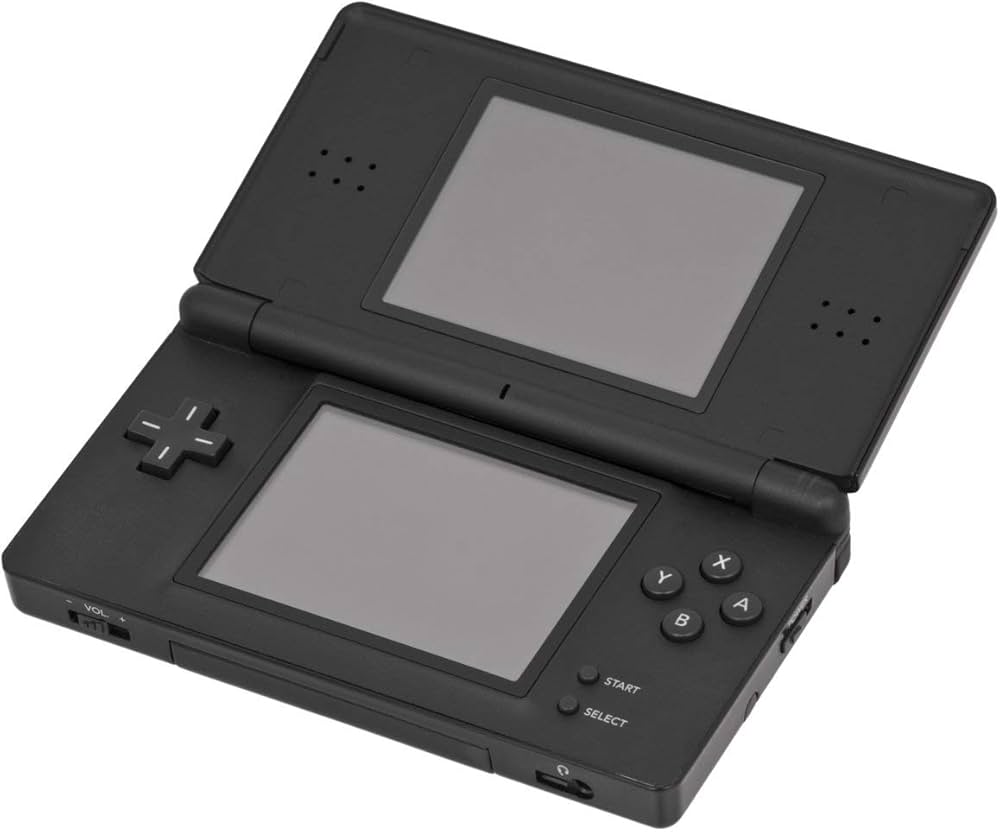
Nintendo DS Console

NDS (Nintendo DS)

Nintendo DS (NDS)

The best-selling handheld console of all time. Released in 2004, the Nintendo DS revolutionized gaming with its dual screens, touch interface, and built-in microphone, paving the way for modern mobile gaming while delivering some of the greatest Nintendo classics ever made. With Rec0m88, you can play retro games from the massive DS library on your desktop, using your mouse for touch controls, customizable screen layouts, and seamless netplay.

Hardware Architecture

The “DS” stands for Dual Screen (or Developer’s System). The console is powered by two distinct processors: a 32-bit ARM946E-S @ 67 MHz handling 3D rendering and main gameplay logic, and a 32-bit ARM7TDMI @ 33 MHz processing 2D graphics, audio, and backward compatibility with the Game Boy Advance.

It features two 3-inch TFT LCD screens, each with a resolution of 256×192. The bottom screen is overlaid with a resistive touchscreen. It also introduced Wi-Fi to Nintendo handhelds, allowing for local wireless and global internet play out of the box.

  • CPUsARM946E-S (67 MHz) + ARM7TDMI (33 MHz)
  • DisplaysDual 256×192 (Lower Resistive Touch)
  • MediaFormats.nds (.zip/.7z supported)

Rec0m88 DS Emulation

Rec0m88 utilizes the incredibly fast and accurate MelonDS core via the EmulatorJS framework. MelonDS excels in 3D rendering accuracy, performance on lower-end devices, and complex Wi-Fi emulation.

BIOS / FIRMWARE REQUIREMENTS

While MelonDS features High-Level Emulation (HLE) that can boot many games without files, for maximum compatibility and boot screens, it is highly recommended to place bios7.bin, bios9.bin, and firmware.bin into your Rec0m88 bios directory.

You can interact with the touch screen directly using your mouse. Rec0m88 also allows you to dynamically change screen layouts—stacking them vertically, side-by-side, or enlarging one screen while minimizing the other.

A Touch of Genius

The Nintendo DS brought gaming to a massive new audience with intuitive touch controls, while simultaneously delivering some of the deepest RPGs and platformers ever crafted for core gamers.

The RPG Juggernaut

The DS is legendary for its JRPG library. It hosts arguably the best Pokémon games ever made (HeartGold / SoulSilver, Black / White), masterpieces like Chrono Trigger DS, and Square Enix marvels like The World Ends With You and Dragon Quest IX. It’s also the home of the Phoenix Wright: Ace Attorney and Professor Layton series.

Wireless Netplay

The original console heavily utilized local wireless. Rec0m88 translates this into internet netplay. You can trade Pokémon with your friends or hit the tracks in Mario Kart DS as if you were sitting in the same room.

Most Popular Nintendo DS Games

Pokémon HeartGold/SoulSilver
JRPG
Mario Kart DS
Racing
Phoenix Wright: Ace Attorney
Visual Novel
Castlevania: Dawn of Sorrow
Metroidvania
Animal Crossing: Wild World
Simulation
The World Ends With You
Action RPG

How to Play Nintendo DS Games Online with Rec0m88

Dual screens and touch controls translate perfectly to your PC with a few simple clicks.

Step 01
Download Rec0m88
Windows · macOS · Linux

Grab the free desktop client. It’s a lightweight GUI frontend that handles all the heavy MelonDS emulation locally on your machine.

Step 02
Check Your BIOS
bios7/9 & firmware

While not strictly required for all games, placing the DS BIOS and firmware files into your Rec0m88 bios folder ensures maximum compatibility.

Step 03
Load & Layout
.nds / .zip

Drag your .nds file into the app. Open the video settings to choose how you want the dual screens displayed (Vertical, Horizontal, or Single Screen Swap).

Step 04
Host Netplay
Create & Connect

Open the netplay menu, add your name, click Create Room, and share the password (if used) with your friends to play Nintendo DS games together over the internet.

Nintendo DS Emulation FAQ

How do I use the touch screen?

Your computer mouse acts as the DS stylus. Simply click and drag on the bottom screen area of the emulator. If you are using a tablet or touch-enabled monitor, you can literally touch the screen just like the original hardware.

How do I arrange the two screens?

By default, the screens are stacked vertically just like the console. However, on widescreen PC monitors, you can go to Core Options > Screen Layout and change it to “Left/Right” or make one screen huge and the other one small in the corner.

What if a game requires blowing into the microphone?

Games like Zelda: Phantom Hourglass or Nintendogs require microphone input. In the Rec0m88 input settings, there is a dedicated “Microphone Noise” button you can map to your controller or keyboard. Pressing this simulates blowing into the mic.

Do I absolutely need the BIOS files?

MelonDS has a built-in High-Level Emulator (HLE) for the BIOS, meaning most games will boot just fine without providing any files. However, if a game crashes, or if you want to use the original DS boot menu and Wi-Fi features, the official bios7.bin, bios9.bin, and firmware.bin files are required.

Ready to play? Download Rec0m88 free and relive the dual-screen revolution today.
Similar Posts

  • Panasonic 3DO

    Retro Console Encyclopedia 3DO Interactive Multiplayer The ambitious, expensive 32-bit pioneer of the CD-ROM era. Released in 1993, the 3DO promised a multimedia revolution, bringing crystal-clear Full Motion Video (FMV) and cutting-edge 3D graphics to the living room. With Rec0m88, you can play retro games from the legendary 3DO library directly on your desktop, complete…

  • Sega Game Gear

    Retro Console Encyclopedia Sega Game Gear The 8-bit handheld that brought full color and a backlit screen to the portable console war. Released in Japan in 1990 and North America in 1991, the Sega Game Gear was a pocket-sized powerhouse. With Rec0m88, you can play retro games from the Game Gear library on your big…

  • TurboGrafx-16

    Retro Console Encyclopedia TurboGrafx-16 (PC Engine) The 16-bit graphics powerhouse with an 8-bit heart. Released in Japan in 1987 as the PC Engine and in North America in 1989, the TurboGrafx-16 revolutionized gaming with its sleek HuCards and pioneered the CD-ROM format. With Rec0m88, you can play retro games from both the standard and CD…

  • C64 (Commodore 64)

    Retro Console Encyclopedia Commodore 64 (C64) The highest-selling single computer model of all time. Released in 1982, the Commodore 64 brought affordable computing and incredible gaming into millions of living rooms. With Rec0m88, you can play retro games from the golden age of microcomputers effortlessly, bypassing complex keyboard commands with streamlined emulation, virtual joysticks, and…

  • PSX (PlayStation 1)

    Retro Console Encyclopedia Sony PlayStation (PS1) The console that brought cinematic 3D gaming to the mainstream. Released in 1994, the original PlayStation (PS1 / PSX) dominated the 32-bit era with its CD-ROM format, sweeping orchestral scores, and massive library. With Rec0m88, you can play retro games from the PS1 era natively on your desktop, complete…

  • GBA (Game Boy Advance)

    Retro Console Encyclopedia Game Boy Advance (GBA) The 32-bit handheld powerhouse. Released in 2001, the Game Boy Advance brought Super Nintendo-level graphics and deeper gameplay into the palms of millions. With Rec0m88, you can play retro games from the GBA library on your big screen with sharp pixel scaling, accurate color correction, and fully integrated…

Leave a Reply

Your email address will not be published. Required fields are marked *