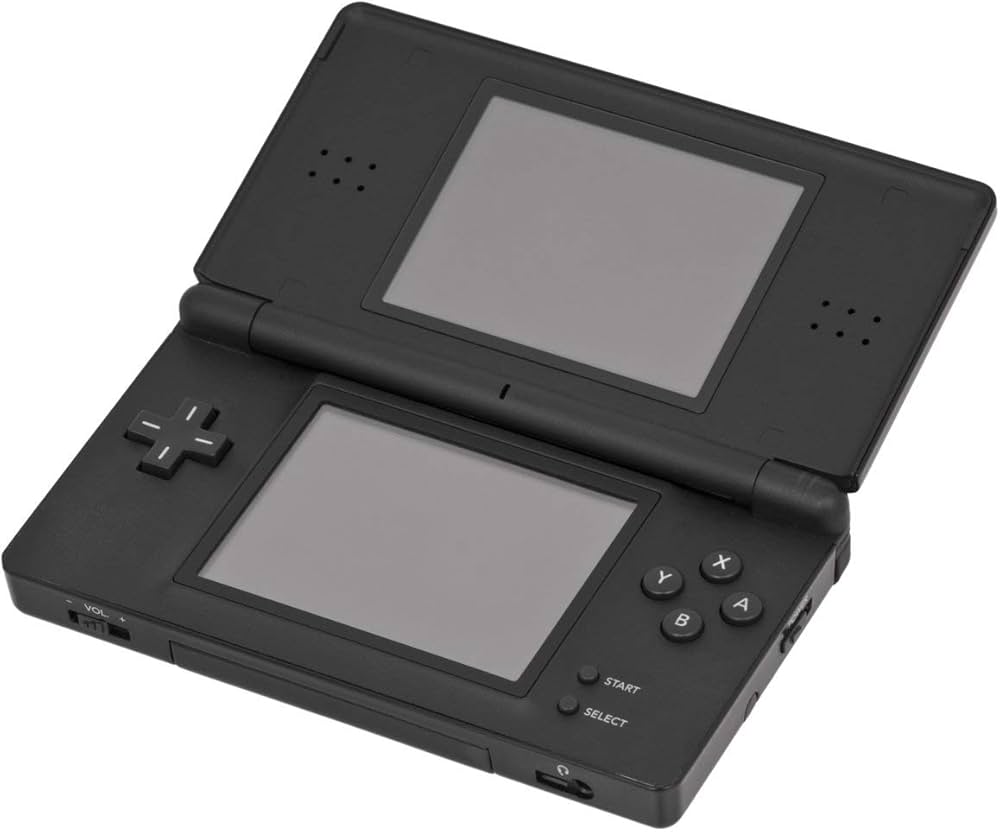
Nintendo DS Console

NDS (Nintendo DS)

Nintendo DS (NDS)

The best-selling handheld console of all time. Released in 2004, the Nintendo DS revolutionized gaming with its dual screens, touch interface, and built-in microphone, paving the way for modern mobile gaming while delivering some of the greatest Nintendo classics ever made. With Rec0m88, you can retro spelletjes spelen from the massive DS library on your desktop, using your mouse for touch controls, customizable screen layouts, and seamless netplay.

Hardware-architectuur

The “DS” stands for Dual Screen (or Developer’s System). The console is powered by two distinct processors: a 32-bit ARM946E-S @ 67 MHz handling 3D rendering and main gameplay logic, and a 32-bit ARM7TDMI @ 33 MHz processing 2D graphics, audio, and backward compatibility with the Game Boy Advance.

It features two 3-inch TFT LCD screens, each with a resolution of 256×192. The bottom screen is overlaid with a resistive touchscreen. It also introduced Wi-Fi to Nintendo handhelds, allowing for local wireless and global internet play out of the box.

  • CPUsARM946E-S (67 MHz) + ARM7TDMI (33 MHz)
  • DisplaysDual 256×192 (Lower Resistive Touch)
  • Mediaformaten.nds (.zip/.7z supported)

Rec0m88 DS Emulation

Rec0m88 utilizes the incredibly fast and accurate MelonDS core via the EmulatorJS framework. MelonDS excels in 3D rendering accuracy, performance on lower-end devices, and complex Wi-Fi emulation.

BIOS / FIRMWARE REQUIREMENTS

While MelonDS features High-Level Emulation (HLE) that can boot many games without files, for maximum compatibility and boot screens, it is highly recommended to place bios7.bin, bios9.bin, en firmware.bin in je Rec0m88 bios map.

You can interact with the touch screen directly using your mouse. Rec0m88 also allows you to dynamically change screen layouts—stacking them vertically, side-by-side, or enlarging one screen while minimizing the other.

A Touch of Genius

The Nintendo DS brought gaming to a massive new audience with intuitive touch controls, while simultaneously delivering some of the deepest RPGs and platformers ever crafted for core gamers.

The RPG Juggernaut

The DS is legendary for its JRPG library. It hosts arguably the best Pokémon games ever made (HeartGold / SoulSilver, Black / White), masterpieces like Chrono Trigger DS, and Square Enix marvels like The World Ends With You en Dragon Quest IX. It’s also the home of the Phoenix Wright: Ace Attorney en Professor Layton series.

Wireless Netplay

The original console heavily utilized local wireless. Rec0m88 translates this into internet netplay. You can trade Pokémon with your friends or hit the tracks in Mario Kart DS as if you were sitting in the same room.

Most Popular Nintendo DS Games

Pokémon HeartGold/SoulSilver
JRPG
Mario Kart DS
Racen
Phoenix Wright: Ace Attorney
Visual Novel
Castlevania: Dawn of Sorrow
Metroidvania
Animal Crossing: Wild World
Simulation
The World Ends With You
Action RPG

How to Play Nintendo DS Games Online with Rec0m88

Dual screens and touch controls translate perfectly to your PC with a few simple clicks.

Stap 01
Downloaden Rec0m88
Windows - macOS - Linux

Grab the free desktop client. It’s a lightweight GUI frontend that handles all the heavy MelonDS emulation locally on your machine.

Stap 02
Check Your BIOS
bios7/9 & firmware

While not strictly required for all games, placing the DS BIOS and firmware files into your Rec0m88 bios folder ensures maximum compatibility.

Stap 03
Load & Layout
.nds / .zip

Drag your .nds file into the app. Open the video settings to choose how you want the dual screens displayed (Vertical, Horizontal, or Single Screen Swap).

Stap 04
Host Netplay
Create & Connect

Open the netplay menu, add your name, click Create Room, and share the password (if used) with your friends to play Nintendo DS games together over the internet.

Nintendo DS Emulation FAQ

How do I use the touch screen?

Your computer mouse acts as the DS stylus. Simply click and drag on the bottom screen area of the emulator. If you are using a tablet or touch-enabled monitor, you can literally touch the screen just like the original hardware.

How do I arrange the two screens?

By default, the screens are stacked vertically just like the console. However, on widescreen PC monitors, you can go to Core Options > Screen Layout and change it to “Left/Right” or make one screen huge and the other one small in the corner.

What if a game requires blowing into the microphone?

Games like Zelda: Phantom Hourglass or Nintendogs require microphone input. In the Rec0m88 input settings, there is a dedicated “Microphone Noise” button you can map to your controller or keyboard. Pressing this simulates blowing into the mic.

Do I absolutely need the BIOS files?

MelonDS has a built-in High-Level Emulator (HLE) for the BIOS, meaning most games will boot just fine without providing any files. However, if a game crashes, or if you want to use the original DS boot menu and Wi-Fi features, the official bios7.bin, bios9.bin, en firmware.bin files are required.

Klaar om te spelen? Download Gratis Rec0m88 and relive the dual-screen revolution today.

Vergelijkbare berichten

  • NES (Nintendo Amusementssysteem)

    Retro Console Encyclopedie Nintendo Entertainment System (NES) De console die een industrie nieuw leven inblies. Ontdek de 8-bit architectuur, legendarische bibliotheek en technische nuances van de NES. Met Rec0m88 kun je retrogames uit het NES-tijdperk spelen met cyclusnauwkeurige emulatie, ondersteuning voor CRT-shaders en naadloze P2P-netplay. Geen configuratie. Geen latentie. Gewoon pure 8-bit nostalgie. Hardware...

  • SNES (Super Nintendo Entertainment System)

    Retro Console Encyclopedie Super Nintendo Entertainment System (SNES) De 16-bit krachtpatser die een generatie definieerde. Het Super Nintendo Entertainment System (SNES), dat in 1990 in Japan en in 1991 in Noord-Amerika werd uitgebracht, zorgde voor baanbrekende graphics, revolutionair geluid en een aantal van de beste spellen ooit gemaakt. Met Rec0m88 kun je retrospellen spelen uit de SNES-bibliotheek...

  • N64 (Nintendo 64)

    Retro Console Encyclopedie Nintendo 64 (N64) De console die de 3D-revolutie inluidde. De Nintendo 64, die in 1996 werd uitgebracht, was een pionier op het gebied van echte 3D-omgevingen, introduceerde de moderne analoge stick en maakte lokale multiplayer voor 4 spelers tot standaard. Met Rec0m88 kun je retrospellen uit het 64-bit tijdperk spelen op je desktop, compleet met hoge-resolutie upscaling,...

  • Panasonic 3DO

    Retro Console Encyclopedie 3DO Interactive Multiplayer De ambitieuze, dure 32-bit pionier van het CD-ROM tijdperk. De 3DO werd uitgebracht in 1993 en beloofde een multimedia-revolutie door kristalheldere Full Motion Video (FMV) en geavanceerde 3D-graphics naar de huiskamer te brengen. Met Rec0m88 kun je retrogames uit de legendarische 3DO-bibliotheek rechtstreeks op je bureaublad spelen, compleet met...

  • PSX (PlayStation 1)

    Retro Console Encyclopedie Sony PlayStation (PS1) De console die cinematisch 3D gamen naar de mainstream bracht. De originele PlayStation (PS1 / PSX) werd in 1994 uitgebracht en domineerde het 32-bits tijdperk met zijn cd-rom formaat, indrukwekkende orkestrale scores en enorme bibliotheek. Met Rec0m88 kun je retro games uit het PS1-tijdperk op je bureaublad spelen, compleet met...

  • TurboGrafx-16

    Retro Console Encyclopedie TurboGrafx-16 (PC Engine) De 16-bit grafische krachtpatser met een 8-bit hart. Uitgebracht in Japan in 1987 als de PC Engine en in Noord-Amerika in 1989, zorgde de TurboGrafx-16 voor een revolutie in gaming met zijn slanke HuCards en was hij een pionier in het CD-ROM formaat. Met Rec0m88 kun je retro games spelen van zowel de standaard als de CD...

Geef een reactie

Je e-mailadres wordt niet gepubliceerd. Vereiste velden zijn gemarkeerd met *