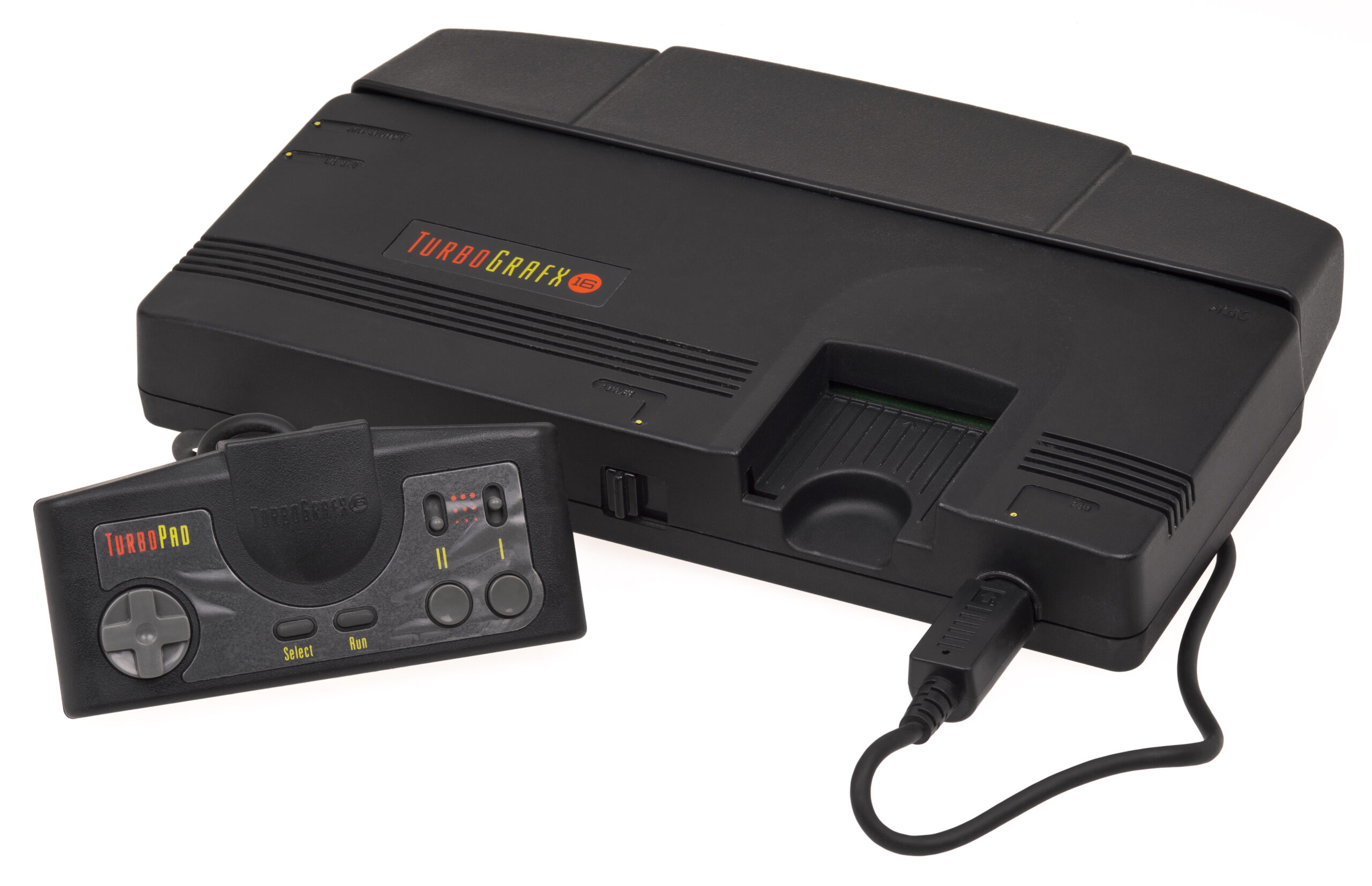
TurboGrafx-16
TurboGrafx-16 (PC Engine)
Das 16-Bit-Grafik-Kraftpaket mit einem 8-Bit-Herzen. Die TurboGrafx-16, die 1987 in Japan als PC Engine und 1989 in Nordamerika auf den Markt kam, revolutionierte das Gaming mit ihren eleganten HuCards und leistete Pionierarbeit beim CD-ROM-Format. Mit Rec0m88 können Sie Retro-Spiele spielen sowohl aus der Standard- als auch aus der CD-Bibliothek direkt auf deinem Desktop, mit schnellen Ladezeiten, CRT-Shader-Unterstützung und verzögerungsfreiem Netzspiel.
Arcade-Perfektion für zu Hause
Das System erlangte Kultstatus, da es einige der besten Scrolling-Shooter (Shmups) und Action-Plattformspiele seiner Zeit bot und zudem die erste Konsole war, die CD-Audio und Sprachausgabe erfolgreich einsetzte.
Unbestrittene Meisterwerke
Das Maskottchen Bonks Abenteuer prägten die Anfänge des Systems, während Castlevania: Rondo of Blood (exklusiv für Super CD-ROM²) gilt weithin als eines der besten Spiele der Reihe. Die Konsole ist eine wahre Fundgrube für Shooter wie Blazing Lazers, R-Type, und Die Herren des Donners, neben Flipper-Klassikern wie Alien Crush und Devil’s Crush.
Der König des Multiplayer-Spiels
Vor dem N64 war die TG-16 dank des Multitap-Adapters die Party-Konsole schlechthin. Mit dem WebRTC-Rollback-Netplay von Rec0m88 kannst du ganz einfach Matches veranstalten, bei denen Bomberman ’93 oder Bomberman ’94, die bis zu 5 Spieler unterstützen und für chaotischen, freundschaftszerstörenden Online-Spaß mit praktisch null Latenz sorgen.
Die beliebtesten TurboGrafx-16-Spiele
So spielst du TG-16-/PCE-Spiele auf Rec0m88
Rec0m88 vereint die unterschiedlichen HuCard- und CD-ROM-Bibliotheken zu einem nahtlosen Desktop-Erlebnis.
Laden Sie sich den kostenlosen Desktop-Client herunter. Es handelt sich um ein schlankes GUI-Frontend, das alle Emulationsprozesse direkt auf Ihrem Rechner ausführt.
Verwenden Sie den kostenlosen „Game Library Organizer“, um Ihren ROM-Ordner zu scannen. Das Programm ruft japanische und US-amerikanische Verpackungsbilder sowie Metadaten ab und exportiert eine übersichtliche Katalogdatei.
Importieren Sie Ihren exportierten Katalog oder ziehen Sie einzelne Dateien per Drag & Drop direkt in das App-Fenster. (Bei CD-Spielen stellen Sie sicher, dass syscard3.pce (befindet sich in Ihrem BIOS-Ordner).
Weise deinem Controller Tasten zu, aktiviere CRT-Shader für das typische Arcade-Feeling und nutze das Netplay-Menü, um einen Raum für epische Bomberman-Matches zu erstellen.
FAQ zur TurboGrafx-16-Emulation
Was ist der Unterschied zwischen PC Engine und TurboGrafx-16?
Es handelt sich um genau dieselbe Hardware. PC Engine war die ursprüngliche japanische Version, während TurboGrafx-16 die umbenannte nordamerikanische Version war. Rec0m88 spielt ROMs aus beiden Regionen nahtlos ab, ohne dass eine Regionumschaltung erforderlich ist.
Brauche ich eine BIOS-Datei?
Standard-HuCard-Spiele (.pce Dateien) benötigen kein BIOS. Wenn Sie jedoch CD-ROM²- oder Super-CD-ROM²-Titel (wie „Castlevania: Rondo of Blood“) spielen möchten, müssen Sie die syscard3.pce Speichern Sie die Datei in Ihrem Rec0m88-BIOS-Verzeichnis.
Welches ist das beste Format für CD-Spiele?
Wir empfehlen Ihnen dringend, Ihre .cue / .bin CD-Spiele in die .chd Format. Es reduziert die Dateigröße des Spiels erheblich, ohne dass dabei Daten oder die Audioqualität verloren gehen, und lässt sich in Rec0m88 sofort laden.
Kann ich Bomberman online spielen?
Ja! Rec0m88 unterstützt WebRTC-Netzwerk-Multiplayer. Du kannst einen Raum erstellen, deine Raum-ID weitergeben und Multiplayer-Titel wie ’Bomberman ’93“ und „’94“ über das Internet mit deinen Freunden spielen. Beide Spieler benötigen lediglich genau dieselbe ROM-Datei.
Bereit zum Spielen? Rec0m88 kostenlos herunterladen und entdecken Sie noch heute das Spielangebot der PC Engine.