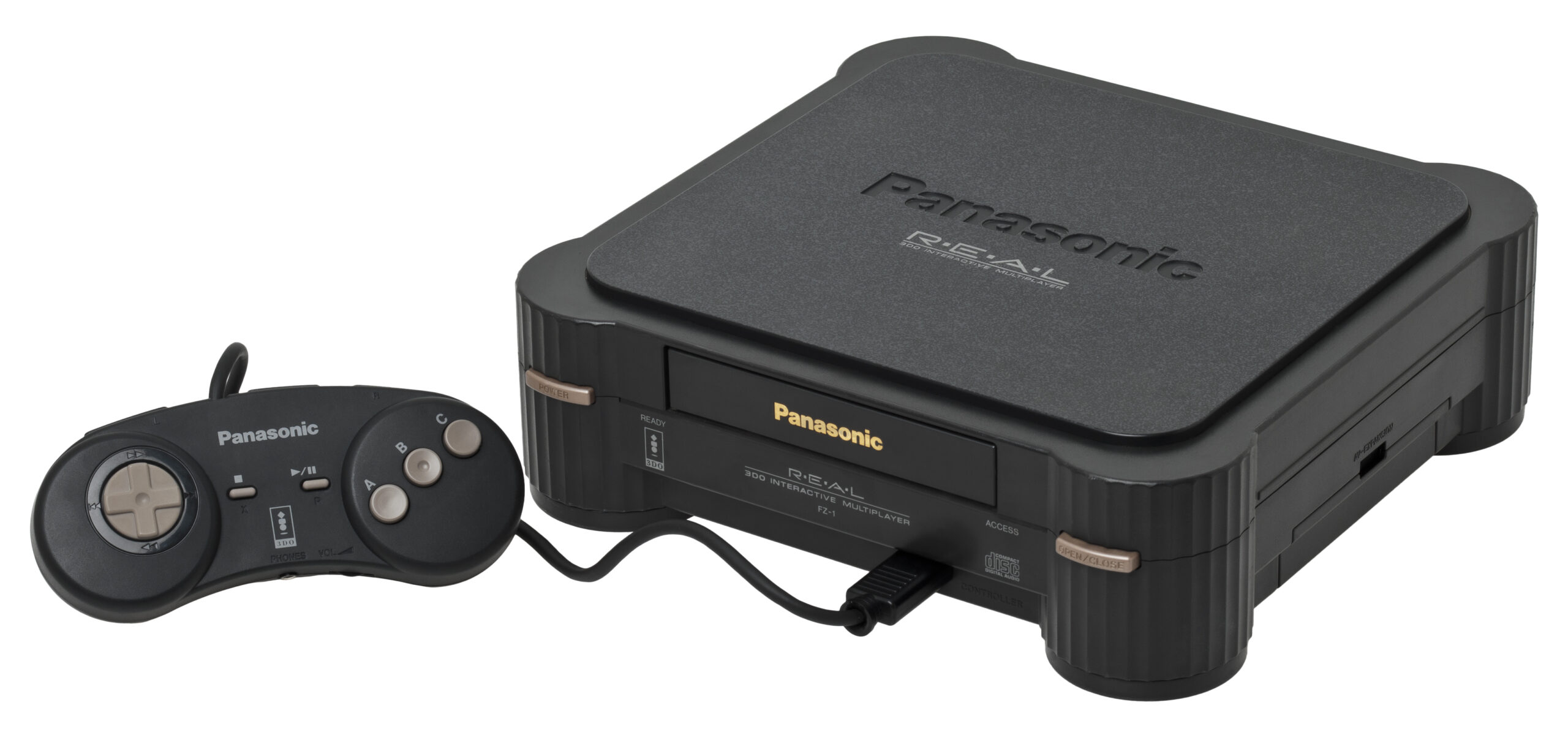
Panasonic 3DO
3DO Multijugador interactivo
El ambicioso y costoso pionero de 32 bits de la era del CD-ROM. Lanzado en 1993, el 3DO prometía una revolución multimedia, llevando video de movimiento completo (FMV) de gran nitidez y gráficos 3D de vanguardia a la sala de estar. Con Rec0m88, puedes jugar a juegos retro de la legendaria biblioteca de 3DO directamente en tu escritorio, con emulación de discos de carga rápida y juego en red sin interrupciones.
La cuna de las franquicias
Aunque su vida útil fue relativamente corta debido a su altísimo precio de lanzamiento de $699, la 3DO fue el escenario del debut de varias franquicias legendarias que acabarían por definir los videojuegos modernos.
Pioneros del CD-ROM
Disfruta de la versión definitiva, con voces de actores, de Star Control II, el combate de motos lleno de acción de Road Rash, y el estreno original de La necesidad de velocidad. La consola también fue un refugio para los juegos interactivos con secuencias de video (FMV), entre ellos el infame Trampa nocturna, Mad Dog McCree, y el debut del gecko bromista, Gex.
Juego en red en cadena
La 3DO original ofrecía la posibilidad única de “conectar en cadena” hasta ocho controladores enchufándolos unos a otros. Rec0m88 se encarga de esto automáticamente a través de WebRTC. Puedes organizar fácilmente partidas del legendario Responder al fuego o Super Street Fighter II Turbo con una sincronización multijugador impecable.
Los juegos más populares de 3DO
Cómo jugar juegos de 3DO en línea con Rec0m88
Configurar la emulación de CD-ROM de primera generación es increíblemente sencillo con nuestro cliente de escritorio. Solo tienes que seleccionar tu BIOS y empezar.
Debes obtener un archivo de BIOS de 3DO y colocarlo en tu directorio de BIOS de Rec0m88. panafz10.bin Se recomienda encarecidamente para lograr la máxima compatibilidad.
Los juegos de 3DO son famosos por su gran tamaño debido al audio en CD y al video sin comprimir. Comprime tu .cue/.bin archivos en uno solo .chd archivos para ahorrar espacio en el disco duro.
El control estándar de 3DO contaba con un D-Pad, los botones A, B y C, y los botones de hombro izquierdo y derecho. Asigna estas funciones en la configuración de entrada para juegos como Street Fighter II.
Aprovecha nuestra arquitectura P2P WebRTC. Abre el menú de juego en línea, ingresa tu nombre, haz clic en «Crear sala» y comparte el ID con tus amigos para jugar juntos a los juegos de 3DO por Internet.
Preguntas frecuentes sobre la emulación de 3DO
¿Para qué necesito un archivo BIOS?
El núcleo de Opera no utiliza emulación de alto nivel (HLE) para eludir el firmware del sistema. Simula con precisión el hardware real, lo que requiere que el sistema operativo de la consola original (la BIOS) inicie los juegos. panafz10.bin se considera la versión más confiable para usar.
¿Por qué los juegos de 3DO son tan grandes?
Al ser una de las primeras consolas con CD-ROM, los desarrolladores estaban ansiosos por llenar los discos de 650 MB con pistas de audio de alta calidad en formato Red Book y escenas cinemáticas de video de movimiento completo (FMV) sin comprimir. Te recomendamos encarecidamente que uses una herramienta como CHDMAN para convertir tus archivos `.cue/.bin` al formato `.chd`, que comprime los datos sin pérdida de calidad.
¿Los juegos de 3DO tienen bloqueo regional?
¡No! La 3DO original no tenía restricciones regionales, y el emulador refleja esto. Puedes jugar títulos exclusivos japoneses, lanzamientos europeos y juegos norteamericanos, todos con el mismo archivo de BIOS, sin necesidad de ninguna configuración especial.
¿Cómo puedo jugar a los juegos que tienen varios discos?
Para títulos como D o Guerrero Supremo, crear un .m3u archivo de lista de reproducción que contenga los nombres exactos de tus discos (por ejemplo, Disc 1.chd, Disc 2.chd). Carga el archivo .m3u en Rec0m88 y usa el menú «Disc Control» en la superposición del emulador para cambiar virtualmente los discos cuando se te solicite.
¿Listo para jugar? Descargar Rec0m88 gratis y vive hoy mismo la revolución multimedia de 32 bits.