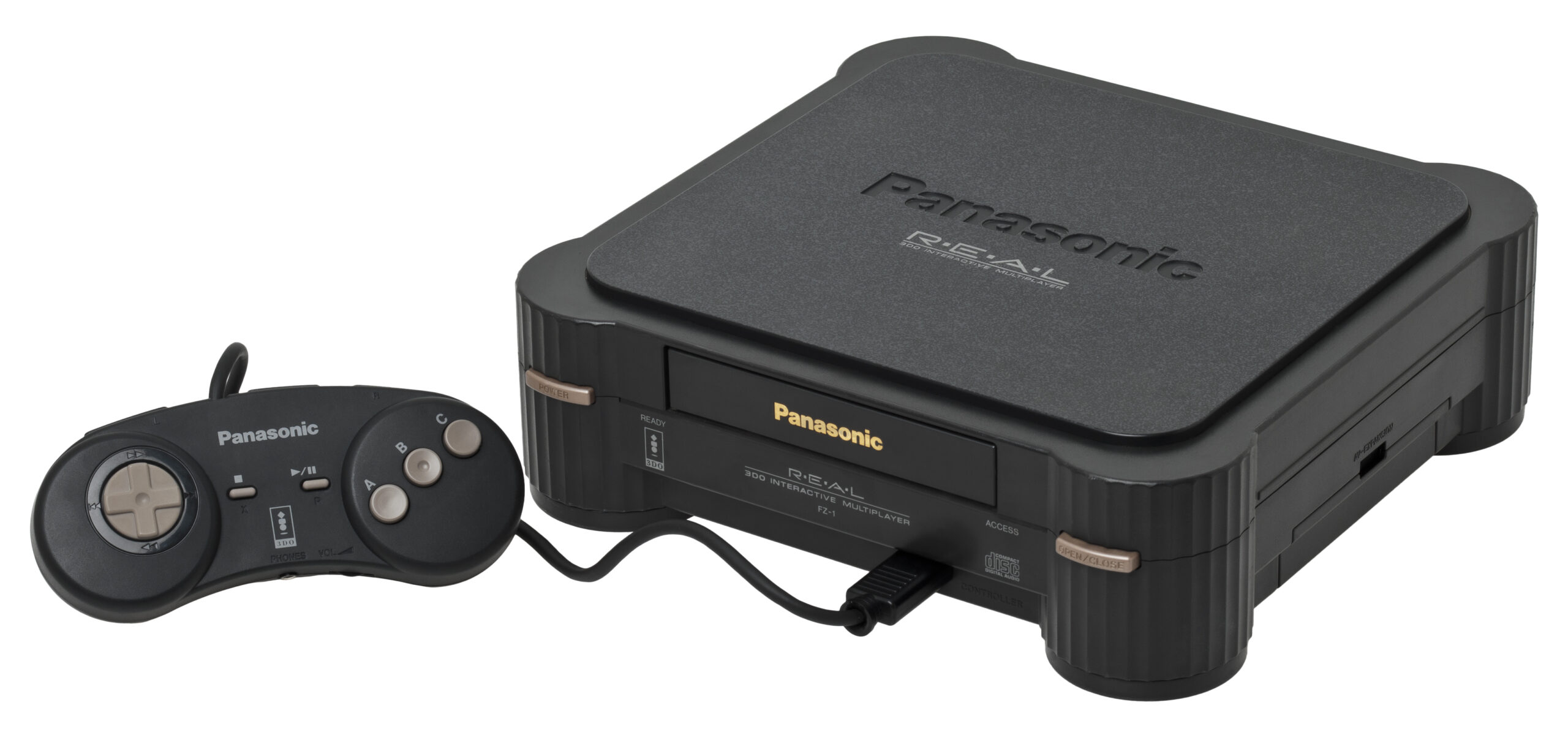
3DO Console

Panasonic 3DO

3DO Interactive Multiplayer

The ambitious, expensive 32-bit pioneer of the CD-ROM era. Released in 1993, the 3DO promised a multimedia revolution, bringing crystal-clear Full Motion Video (FMV) and cutting-edge 3D graphics to the living room. With Rec0m88, you can Retro-Spiele spielen from the legendary 3DO library directly on your desktop, complete with fast-loading disk emulation and seamless netplay.

Hardware Architecture

Conceived by Electronic Arts founder Trip Hawkins, the 3DO was not manufactured by a single company. Instead, the specifications were licensed to hardware giants like Panasonic, GoldStar, and Sanyo. The console is powered by a 32-bit ARM60 RISC CPU running at 12.5 MHz.

Its true strength lay in its two custom video coprocessors, which were capable of advanced texture mapping, lighting, and scaling far beyond what the Genesis and SNES could do. It also featured a custom 16-bit DSP for CD-quality audio and an early internal save-game memory system (NVRAM).

  • CPU32-bit ARM60 RISC @ 12.5 MHz
  • GraphicsDual Custom Coprocessors, 2MB RAM, 1MB VRAM
  • MediaFormats.chd .cue/.bin .iso

Rec0m88 3DO Emulation

Rec0m88 utilizes the highly accurate Opera core (a modernized fork of the renowned 4DO emulator) via the EmulatorJS framework. This core offers exceptional compatibility with the entire 3DO library, perfectly rendering its unique FMV sequences and pseudo-3D environments.

BIOS REQUIREMENTS (CRITICAL)

The 3DO emulator requires an official BIOS file to boot games. You must place the panafz10.bin file (the recommended Panasonic FZ-10 BIOS) into your Rec0m88 bios directory. Without it, the emulator will fail to launch.

The system natively supports modern enhancements like save states, NVRAM management (for your in-game saves), and seamless multi-disc loading for massive, cinematic titles.

The Birthplace of Franchises

Though its lifespan was relatively short due to its massive $699 launch price, the 3DO hosted the debut of several legendary franchises that would go on to define modern gaming.

CD-ROM Pioneers

Experience the definitive, voice-acted version of Star Control II, the gritty motorcycle combat of Road Rash, and the original debut of The Need for Speed. The system was also a haven for interactive FMV games, including the infamous Night Trap, Mad Dog McCree, and the debut of the wise-cracking gecko, Gex.

Daisy-Chained Netplay

The original 3DO uniquely allowed players to “daisy-chain” up to eight controllers by plugging them into one another. Rec0m88 handles this automatically over WebRTC. You can easily host matches of the legendary Return Fire oder Super Street Fighter II Turbo with flawless multiplayer sync.

Most Popular 3DO Games

Star Control II
Sci-Fi Adventure
Road Rash
Combat Racing
The Need for Speed
Rennsport
Gex
Platformer
Return Fire
Action / Co-Op
Super Street Fighter II Turbo
Kämpfen

How to Play 3DO Games Online with Rec0m88

Setting up early CD-ROM emulation is incredibly simple using our desktop client. Just grab your BIOS and jump in.

Step 01
Install BIOS Files
panafz10.bin

You must obtain a 3DO BIOS file and place it in your Rec0m88 bios directory. panafz10.bin is highly recommended for maximum compatibility.

Step 02
Format Your ROMs
Convert to .CHD

3DO games are notoriously large due to CD audio and uncompressed video. Compress your .cue/.bin files into single .chd files to save hard drive space.

Step 03
Map Controller
6-Button Pad

The standard 3DO controller featured a D-Pad, A, B, C buttons, and Left/Right shoulder buttons. Map these in the input settings for games like Street Fighter II.

Step 04
Host Netplay
WebRTC · Share ID

Utilize our P2P WebRTC architecture. Open the netplay menu, add your name, click Create Room, and share the ID with your friends to play 3DO games together over the internet.

3DO Emulation FAQ

Why do I need a BIOS file?

The Opera core does not use high-level emulation (HLE) to bypass the system firmware. It accurately simulates the actual hardware, which requires the original console’s operating system (the BIOS) to boot games. panafz10.bin is considered the most reliable version to use.

Why are 3DO games so large?

As one of the first CD-ROM consoles, developers were eager to fill the 650MB discs with high-quality Red Book audio tracks and uncompressed Full Motion Video (FMV) cutscenes. We highly recommend using a tool like CHDMAN to convert your `.cue/.bin` files into `.chd` format, which compresses the data losslessly.

Are 3DO games region locked?

No! The original 3DO was completely region-free, and the emulator reflects this. You can play Japanese exclusives, European releases, and North American games all using the exact same BIOS file with no special configuration.

How do I play games that have multiple discs?

For titles like D oder Supreme Warrior, create an .m3u playlist file containing the exact filenames of your discs (e.g., Disc 1.chd, Disc 2.chd). Load the .m3u file into Rec0m88, and use the Disc Control menu in the emulator overlay to virtually swap discs when prompted.

Ready to play? Download Rec0m88 free and experience the 32-bit multimedia revolution today.
Ähnliche Beiträge

  • Wonderswan

    Retro Console Encyclopedia Bandai WonderSwan The final hardware masterpiece from Game Boy creator Gunpei Yokoi. Released exclusively in Japan in 1999 (and followed by the Color and Crystal models), the WonderSwan challenged Nintendo with its unique design that allowed games to be played horizontally or vertically. With Rec0m88, you can play retro games from this…

  • NES (Nintendo Entertainment System)

    Retro Console Encyclopedia Nintendo Entertainment System (NES) The console that revived an industry. Explore the 8-bit architecture, legendary library, and technical nuances of the NES. With Rec0m88, you can play retro games from the NES era with cycle-accurate emulation, CRT shader support, and seamless P2P netplay. No configuration. No latency. Just pure 8-bit nostalgia. Hardware…

  • Sega Saturn

    Retro Console Encyclopedia Sega Saturn The undisputed king of 32-bit 2D graphics and Sega’s most complex hardware achievement. Released in 1994, the Sega Saturn delivered arcade-perfect fighting games, groundbreaking shooters, and an unparalleled Japanese library. With Rec0m88, you can play retro games from the Saturn era natively on your desktop, conquering its legendary dual-CPU architecture…

  • C64 (Commodore 64)

    Retro Console Encyclopedia Commodore 64 (C64) The highest-selling single computer model of all time. Released in 1982, the Commodore 64 brought affordable computing and incredible gaming into millions of living rooms. With Rec0m88, you can play retro games from the golden age of microcomputers effortlessly, bypassing complex keyboard commands with streamlined emulation, virtual joysticks, and…

Schreibe einen Kommentar

Deine E-Mail-Adresse wird nicht veröffentlicht. Erforderliche Felder sind mit * markiert