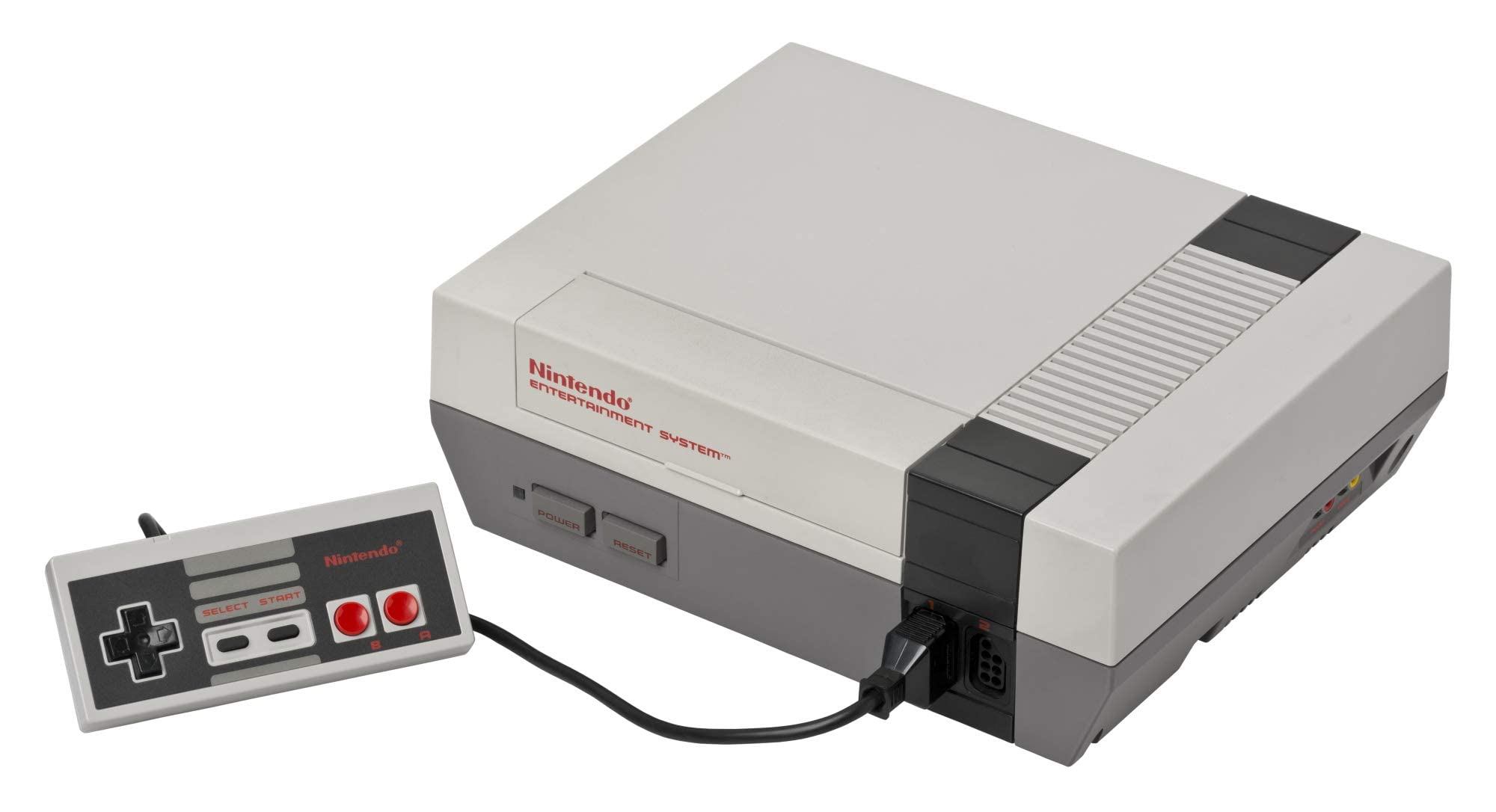
NES Console

NES (Nintendo Entertainment System)

Nintendo Entertainment System (NES)

The console that revived an industry. Explore the 8-bit architecture, legendary library, and technical nuances of the NES. With Rec0m88, you can hrát retro hry from the NES era with cycle-accurate emulation, CRT shader support, and seamless P2P netplay. No configuration. No latency. Just pure 8-bit nostalgia.

Hardwarová architektura

Launched as the Family Computer (Famicom) in Japan on July 15, 1983, and rebranded for North America on October 18, 1985, the NES is built around the 8-bit Ricoh 2A03 CPU (a modified MOS 6502) running at 1.79 MHz (NTSC). The system features 2 KB of onboard RAM and a dedicated Picture Processing Unit (PPU) capable of rendering 256×240 resolution with a 52-color palette from 64 available colors.

What truly defined the NES was its audio and expansion capabilities. The Audio Processing Unit (APU) provides five sound channels. The cartridge slot allowed for Mapper Chips (like MMC1, MMC3, and VRC6) inside the game carts themselves, expanding memory, enabling advanced scrolling effects, and adding extra audio channels.

  • ProcesorRicoh 2A03 @ 1.79 MHz (NTSC)
  • GrafikaPPU, 256×240, 64 sprites on screen
  • Formáty médií.nes .unf .fds (.zip/.7z supported)

Rec0m88 NES Emulation

Rec0m88 utilizes the EmulátorJS framework to deliver high-fidelity NES emulation. We default to the fceumm core for its exceptional balance of speed and compatibility, while offering the Nestopia core for users demanding cycle-accurate precision. Both cores support the full range of mapper chips, ensuring that even complex titles run flawlessly.

POŽADAVKY NA BIOS

Standard NES: Není třeba BIOS.
Famicom Disk System: Requires disksys.rom.
Game Genie: Requires gamegenie.nes (fceumm only). Rec0m88 has its own editable, built-in cheats that can be used.

When you hrát retro hry on Rec0m88, you benefit from modern enhancements without compromising authenticity. Features include instant save states, rewind functionality, fast-forward, CRT shaders, and customizable controller mapping.

Iconic Titles & Netplay Revolution

The NES library established genres that dominate gaming today. From tough-as-nails platformers to the dawn of console RPGs, it laid the foundation for modern interactive entertainment.

The Definitive 8-Bit Library

Platformers reached new heights with Super Mario Bros. a Super Mario Bros. 3, while The Legend of Zelda a Metroid pioneered non-linear exploration. RPGs found their console footing with Final Fantasy a Dragon Quest, and action shooters like Contra a Mega Man tested the reflexes of a generation. Whether you’re revisiting classics or discovering hidden gems, Rec0m88 ensures every title runs with pixel-perfect accuracy.

World-Class Netplay

Rec0m88 transforms the solitary experience of emulation into a social one. Our Hraní online přes WebRTC allows you to play online with friends as if they were sitting next to you. Simply host a room, share the ID, and jump into co-op classics like Contra, Bubble Bobble, nebo TMNT. Competitive titles like Tetris a Dr. Mario also shine with our low-latency architecture.

Most Popular NES Games

Super Mario Bros. 3
Plošinovka
The Legend of Zelda
Akční dobrodružství
Contra
Run & Gun / Co-Op
Mega Man 2
Akční plošinovka
Metroid
Akční dobrodružství
Punch-Out!!
Sports / Action

How to Play NES Games on Rec0m88

Rec0m88 offers a streamlined desktop experience for managing and playing your NES collection. Follow these steps to build your library and start gaming instantly.

Krok 01
Stáhnout Rec0m88
Windows · macOS · Linux

Grab the free desktop client. It’s a lightweight GUI frontend that integrates EmulatorJS cores for instant emulation without browser overhead.

Krok 02
Uspořádejte si knihovnu
Metadata · Obal hry

Use the free Game Library Organizer to scan your ROM folder. It fetches box art and metadata, exporting a clean Rec0m88 Catalog file.

Krok 03
Načtěte si ROM
.nes / .zip / .7z

Import your exported Catalog, or drag-and-drop individual files directly into the app window to launch instantly.

Krok 04
Spustit síťovou hru
ID hostitele a sdílení

Map your controller, enable CRT shaders, and use the Netplay menu to host rooms and play multiplayer classics together.

NES Emulation FAQ

Do I need a BIOS file to play NES games?

No. Standard NES cartridge games do not require a BIOS file. However, if you want to play Famicom Disk System (FDS) titles, you must place a disksys.rom file in your BIOS directory. Rec0m88 will automatically detect it.

Why does a specific game have graphical glitches?

Some obscure titles use rare mapper chips that may behave differently across cores. If you encounter issues, try switching the emulation core in the settings. Nestopia offers higher accuracy for tricky mappers, while fceumm provides broader compatibility.

Can I play NES games online with friends?

Yes. Rec0m88 features built-in P2P rollback netplay. You can host a room and share the Room ID with a friend. Both players need the same ROM file. The connection is direct and low-latency, perfect for co-op and versus play.

What file formats are supported?

Rec0m88 supports .nes, .unif, .unf, and .fds formats. You can also load games compressed in .zip or .7z archives; the emulator will extract them automatically. Ensure your ROMs have correct headers for best compatibility.

Jsi připravený hrát? Stáhněte si Rec0m88 zdarma and experience the 8-bit library in pixel-perfect accuracy today.
Podobné příspěvky

  • MAME (Multiple Arcade Machine Emulator)

    Encyklopedie retro konzolí MAME & Arcade Nejdokonalejší projekt na zachování. MAME (Multiple Arcade Machine Emulator) přináší zlatý věk mincovních automatů přímo na vaši obrazovku. Od neonově osvětlených 80. let až po boom soutěžních bojových her v 90. letech představoval arkádový hardware vždy špičku herní techniky. S Rec0m88 si můžete zahrát retro...

  • Wonderswan

    Retro Console Encyclopedia Bandai WonderSwan Poslední hardwarové dílo tvůrce Game Boye Gunpeie Yokoie. WonderSwan, vydaný exkluzivně v Japonsku v roce 1999 (a následovaný modely Color a Crystal), byl výzvou pro společnost Nintendo svým jedinečným designem, který umožňoval hrát hry horizontálně nebo vertikálně. S Rec0m88 si můžete zahrát retro hry z této konzole....

  • SNES (Super Nintendo Entertainment System)

    Encyklopedie retro konzolí – Super Nintendo Entertainment System (SNES) – 16bitový gigant, který definoval celou generaci. Super Nintendo Entertainment System (SNES), uvedené na trh v Japonsku v roce 1990 a v Severní Americe v roce 1991, přineslo průlomovou grafiku, revoluční zvuk a některé z nejlepších her, jaké kdy byly vytvořeny. S aplikací Rec0m88 můžete hrát retro hry z knihovny SNES…

  • Sega Saturn

    Encyklopedie retro konzolí: Sega Saturn – Nesporný král 32bitové 2D grafiky a nejsložitější hardwarový počin společnosti Sega. Konzole Sega Saturn, uvedená na trh v roce 1994, přinesla bojové hry v kvalitě rovnocenné arkádovým verzím, průkopnické střílečky a bezkonkurenční nabídku japonských her. Díky Rec0m88 můžete hrát retro hry z éry Saturnu přímo na svém počítači a zvládnout tak její legendární architekturu se dvěma procesory…

  • GBA (Game Boy Advance)

    Encyklopedie retro konzolí: Game Boy Advance (GBA) – 32bitový přenosný výkonový gigant. Game Boy Advance, uvedený na trh v roce 2001, přinesl milionům hráčů grafiku na úrovni Super Nintendo a propracovanější herní zážitek přímo do dlaní. Díky Rec0m88 můžete hrát retro hry z knihovny GBA na velké obrazovce s ostrým škálováním pixelů, přesnou korekcí barev a plně integrovanými…

  • NDS (Nintendo DS)

    Retro encyklopedie konzolí Nintendo DS (NDS) Nejprodávanější kapesní konzole všech dob. Nintendo DS, které bylo vydáno v roce 2004, způsobilo revoluci v hraní her díky dvěma obrazovkám, dotykovému rozhraní a vestavěnému mikrofonu, čímž připravilo půdu pro moderní mobilní hraní a zároveň přineslo některé z nejlepších klasických her, které kdy Nintendo vytvořilo. S Rec0m88 si můžete zahrát retro hry z...

Napsat komentář

Vaše e-mailová adresa nebude zveřejněna. Vyžadované informace jsou označeny *